
New Wordpress 2.3.3 Exploit/Vulnerability – Adds Spam Directory /wp-content/1/
Posted on March 23rd, 2008 at 3:51 am by Michael VanDeMar under On The Ball-ness, blogthropology, coding, nerdiness, scams
Ok, so I just had 2 of my WP installs hacked, on 2 different servers. This is not the same thing that Shoemoney reported on a few days back (hidden link injection), and as of yet I have not seen any definitive answers as to what it is. All of my blogs were upgraded to 2.3.3 last month, and in all but 2 of them the only thing that was kept was the database… the sites themselves were moved to completely different servers in fact, with clean installs.
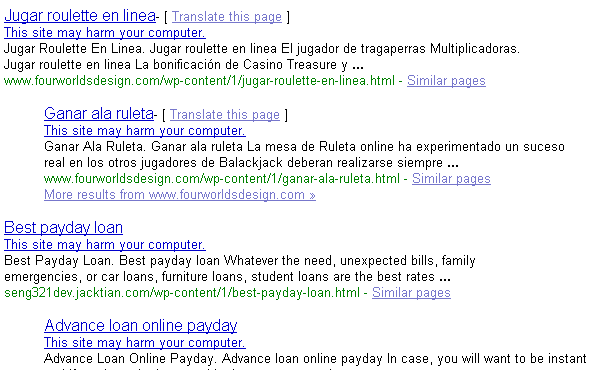
Whereas the WP exploit that Shoemoney and others reported on allowed an attacker to bypass the nofollow routine, and inject search engine friendly spammy links into your comments that were hidden via a <noscript> tag, this one actually creates an entirely new directory, /wp-content/1/, and loads it full of spammy html files containing Javascript redirects in them. You can see the number of affected blogs that Google has already indexed via this query: inurl:wp-content/1/ (cached version).
Please note that I do strongly advise any non-tech savvy people refrain from visiting any of the infected pages listed in those serps, or on their own blogs if they find that they have been hacked. As reported by this blog, at least one of the pages redirects you to a fake Google login screen as a phishing attempt. I have not gone through the other pages myself yet, so therefore have no idea whatsoever what other bits of nastiness they might be holding or might attempt to do. Yes, in general phishing attempts are easy to spot, but not everything that can be maliciously delivered via a webpage is. Also, notice in the search results, Google has already flagged some of these new pages as harmful, but a lack of a flag does not make them safe:
It is better to check your blog for the existence of the directory though FTP.
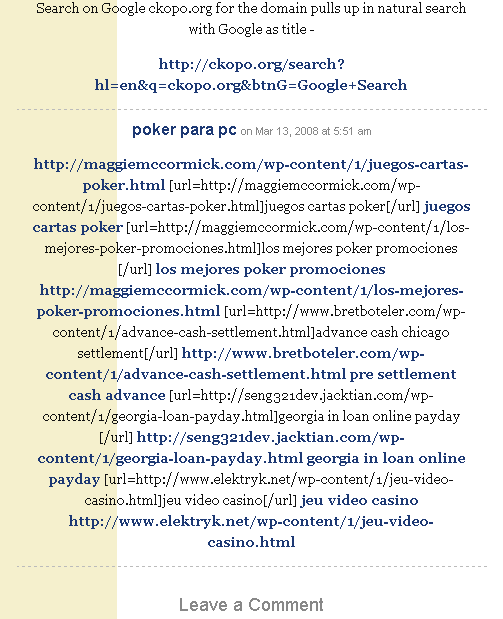
Apparently the hackers are spamming comments in posts as well, and pointing links at the now infected blog pages to get them spidered and to get people to visit them… such as what they are doing here on this post on SearchEngineJournal, (look at the last comment):
This issue was already reported here on Wordpress.org, and whooami claims to have fixed the issue for the original poster on his her blog here and here. However, his fix is based around renaming the cookies used by Wordpress by default, and he does make the disclaimer that is he not a developer. If the exploit is hacking the cookies, and whatever current bot is looking for a specific cookie name, then yes, that would stop what is out there now… but it would not fix the issue.
As of this writing I could not find any actual solutions to this, so if anyone figures out exactly how the attack is being carried out please let us know.
If you have enjoyed what you read here, please consider subscribing to my feed.


March 23rd, 2008 at 5:33 am
I really resent being represented in this post, first. I am female, one and I dont claim anything — I merely posted what I did and the results therein.
Secondly, I never suggested either on the WP forums, or on my own blog that I had discovered or successfully determined the cause of the wp-content/1 hack.
I DO know how the links inside the posts are being created though, and thats what I specifically addressed.
Third, I indicate, in both of my posts, that it is possible to set up $_POST logging. You want to know how its done — you do that. Instead of getting all uptight in a comment, you might have just dropped me an email asking for help in doing that.
March 23rd, 2008 at 5:41 am
Oops, yes I did help someone with the wp-content/1 stuff. My mistake on that.
MY last comment stands though — you want to know how its done, you log the attempts.
March 23rd, 2008 at 6:11 am
Damn!! I was token too…i’ve a directory in my blog too.
Do you think that playing with robts.txt could help?
If i Do:
User-agent: *
# Directories
Disallow: /wp-content/
Does it prevents the spam?
I’ve found this directoy in http://www.myblog/wp-content/1/
March 23rd, 2008 at 7:08 am
Just got my WP 2.1.3 hacked and upgraded to 2.3.3. Now something else to worry about. Going to move the site to Drupal.
March 23rd, 2008 at 10:01 am
@whoo – sorry about the gender mix up, edited the post.
As to what I said you claimed… no offense (none was intended from the beginning, btw), but you actually did. In this comment, in the thread about this exploit, you make the assertion that the issue is resolved for the original poster, and then immediately point to the two posts on your blog.
March 23rd, 2008 at 10:03 am
@Enrico – No, blocking a malicious bot by using robots.txt will unfortunately not fix this problem.
March 23rd, 2008 at 12:07 pm
Here’s an idea on how to put a final end to this kind of problem:
http://pocketseo.com/black-hat/255
March 23rd, 2008 at 3:31 pm
@Pocket SEO – while that might be useful, I don’t think it is the optimal solution. The solution is to close the holes in the first place. I would much rather the hackers be kept out than me just getting notified once they are in. Plus while that idea does help if they modify or upload any files, it wouldn’t indicate extra database activity, which happens every time someone comments, or with some tracking plugins, just visits the site. Your idea wouldn’t be a bad one though as an extra layer.
March 23rd, 2008 at 3:48 pm
Good point about the database. I suppose they could just insert some hidden text embedded within posts in the database. I wonder if a small desktop program could check post, comment and excerpt text also.
It would be great if someone would close the holes
March 24th, 2008 at 12:05 pm
Is there any way to quickly check you blog for any of the currents infections (spam-directory, invisible links, hidden frames)? I hate checking all my blogs manually every couple of days.
March 24th, 2008 at 12:19 pm
@Malte
Setup Google Alerts with queries like:
site:example.com porn
site:example.com poker
etc.
It would at least catch it early.
March 24th, 2008 at 1:21 pm
Here what i did:
1° Download Xenu to check all my outbound links
2° Set up robots.txt to exclude crawling the wp-content directory
3° In the options of my blog i set up the user registrations have to be approved by me first and that to comment a user have to be registered
4° set up google alerts site:mywebsite porn etc…
Thanks for the tips
Enrico
March 24th, 2008 at 2:10 pm
About the Google Alert – good idea though if you want to check for this particular problem instead of general porn, etc. try a query like this [inurl:wp-content/1/ site:YOURDOMAIN.com]
This is a pretty creepy problem and I hope WP comes up with a real solution fast. Thanks for pointing it out Michael.
March 24th, 2008 at 9:51 pm
I have nothing to add. Just wanting to subscribe to this comment thread.
Hopefully someone comes up with a permanent solution before it ruins us.
March 24th, 2008 at 10:53 pm
Hey take off that link to seo.mhvt.net. I visit that site you linked to and it tried to open my outlook express email, but luckly I did not install it.
March 24th, 2008 at 10:58 pm
@windtalker – I have no idea what you are referring to, that blog is fine. Very annoying flash ad trying to tell me I am the 1,000,000th visitor… but other than that nothing happens. I think you must have clicked on an email link.
March 25th, 2008 at 5:53 am
Since I read this post a few days ago, there was no “victim” in the Netherlands, but now there are a lot more victims.
March 25th, 2008 at 6:28 am
What if you create the /wp-content/1 directory yourself and and set CHMOD to 000?
March 25th, 2008 at 7:30 am
Blocking though robots.txt isn’t a great idea
1. You can limit your traffic from image searches
2. Those Google alerts are a lot less likely to notify you of rogue pages, other than based upon words in the URLs.
March 25th, 2008 at 9:22 am
I was hit yesterday with this exploit. I caught it quickly as I was working on my site and had been into the content directory just a few minutes before and the ‘1′ directory wasn’t there.. I immediately deleted it. After reading this article I downloaded and ran Xenu on my site.
I discovered links to another site with a ‘1′ directory paulsmithdesigns.com which I tried to load in order to warn him of the problem, only to find the site wouldn’t load. When I searched out where the links were on my site I found them buried in a posting on my front page.
What really ticked me off was the piece of crap that spammed my post chose the post on the page that is a memorial to the latest Canadian combat death in Afghanistan. Disgusting piece of … grrrr
March 25th, 2008 at 10:29 am
@Andy
I haven’t tested it long enough to be sure, but it seems to be working. Google sent me a couple of alerts from previous crawls (I hope they were previous crawls). There are no keywords in my URLs (experimental blog).
March 25th, 2008 at 10:55 am
@L3ST: that might be a good ideea.
March 25th, 2008 at 5:59 pm
@L3ST:
Unless the script can catch on and modify it to wp-content/2 or something else, this should nip it in the bud. I’ve went ahead and done this just in case. What could it hurt?
March 25th, 2008 at 6:06 pm
Just did a check at google to see how many were infected: 2890
Just go to google and type inurl:wp-content/1/
March 25th, 2008 at 6:36 pm
Here’s a little tidbit of info:
I googled all the websites that have this directory just out of curiosity.
Being the super-humanely wonderful person I am, I decided to leave comments on as many of the websites as I could to let them know that they had been hit with this.
I made it throught 10 domains before I figured this out:
EVERY SINGLE ONE OF THOSE WEBSITES REQUIRE ME TO REGISTER TO COMMENT.
Coincedence? Maybe.
March 26th, 2008 at 1:21 am
@UnTechy I don’t think it depends on this. My website was attacked and i had comments must be approved by administrator, i don’t required to comment for registered user.
March 26th, 2008 at 7:45 am
Have you had any readers register for unknown reasons? Someone mentioned on another site that they had 2 people register to their blog even though the blog didn’t require you to register before commenting. After that, their site had been exploited.
March 27th, 2008 at 12:52 pm
@unTECHy: I think you’re probably on to something. Sites that allow open registration are probably what makes them vulnerable. Wasn’t this how the WordPress 2.3.2 blogs were exploited as well? Through open registrations…
March 27th, 2008 at 4:39 pm
Yes, that is how the 2.3.2 exploit worked. I’ve closed registration and created the wp-conent/1/ directory manually with a chmod of 000 to disallow any reading, writing, or changing of any files in that direcory.
I’m not saying this will help, but it’s the best I can do until someone figures it out.
March 27th, 2008 at 11:25 pm
I just got hit with this, and they injected a few posts with credit card spam links, some in that ‘1′ directory. Unfortunately for me, google immediately removed me from their index due to having that spam, all before I woke up !
March 28th, 2008 at 12:05 am
Hi,
Thank you for this useful article. I am aware now that we must be more careful in using WP.
March 28th, 2008 at 2:02 am
Here something interesting:
- Renamed my cookies name
- changed the admin password
- de-checked: anyone can register
- checked: user have to be registered to post comments
Now i’ve seen that they have recreated the new directory wp-contents/1/ but this time the directory is empty.
I’ve noted that the posted that have been injected were those i’ve wrote after the upgrate dto 2.3.3., i have created a new post and looks that there is injection
March 29th, 2008 at 2:42 am
i saw your post and thought i’d give this issue some importance, because i also use wordpress and a friend told me he got hacked.
so i wrote this article about the issue
http://websecurity.ro/blog/200.....y-exploit/
March 29th, 2008 at 11:39 am
Here is a temporary hack until you guys can figure out a permanent solution.
.htaccess password protect the Shit directory!!!
Regards,
Igor The Troll
March 29th, 2008 at 2:58 pm
What if I have dozens of folders under wp-content/ ? How do I know if a directory is mine or not? Can wordpress hosted at wordpress.com be hijaked too?
March 29th, 2008 at 4:28 pm
There are only 2 directories that WorPress puts in there by default. It is your Plugins and Themes folders. Any other folder in that dirctory probably isn’t yours.
I’d check each folder though as maybe you have a plugin that is putting folders in that directory.
March 29th, 2008 at 5:53 pm
I was worried this exploit would hit my blog but so far I’m not getting any strange directories in my wp-content folder.
March 29th, 2008 at 7:02 pm
You have Themes, plugins and uploads. You may also have a folder named backup-*something*. That’s if you use the auto-backup plugin.
March 30th, 2008 at 9:16 am
Instead of all the uograde is seems the wordpress still have some dangerous bugs .
hope that will the new fiwed version everything will be OK .
April 1st, 2008 at 11:34 pm
That attack is being followed up by a comment spam campaign to point links at those hacked pages. You can block it by putting wp-content/1/ in your comment blacklist.
April 2nd, 2008 at 5:50 am
anyway i will try to put wp-content/1/ in my comment blacklist
hope that it will be a temporal solution
April 2nd, 2008 at 5:52 pm
“That attack is being followed up by a comment spam campaign to point links at those hacked pages”
Wow, thats like someone stealing your glove and smacking you in the face with it.
April 6th, 2008 at 12:05 pm
Good site I “Stumbledupon” it today and gave it a stumble for you.. looking forward to seeing what else you have..later
April 7th, 2008 at 5:23 pm
Very useful, thanks! Took a while to figure out why Google didn’t like my friend’s site. Wish that http://www.stopbadware.org/ had been a bit more forthcoming with info.
April 8th, 2008 at 8:16 am
This blog site was hacked – how it was done and why you need to upgrade WordPress NOW!…
This blog site was hacked. Cracked. Whatever you want to say. We appear to have been hit by spammers / black hat SEO types. It turns out that we are not alone. So let’s talk about what happened and why.
First, though, if you use WordPress on you…
April 11th, 2008 at 10:15 am
As far as I understand it, the exploit relies on using xml-rpc – the spammer creates a user on your site, then gets in through the holes in xmlrpc.
Simple solution – if you don’t do remote access, dump the file xmlrpc.php – handy if you have an old installation.
The reason it’s happened to WordPress more than other systems is probably largely down to its popularity and the number of non-techie users rather than bad coding on the side of the WP developers. Making ultra safe web applications is always tricky – and WP is a huge target for hackers.
April 11th, 2008 at 10:22 am
David – maybe, but it was my understanding that they actually had closed the xml-rpc issue with 2.3.3. From what I saw, and from looking around, this struck me more as an issue of hacking the cookies. If that is the case, then hopefully the fact that they switched to encrypted cookies might actually fix it.
I would think that if the same exploit worked on 2.5 we would have heard about it somewhere by now, so… fingers crossed.
April 29th, 2008 at 1:10 pm
[...] for more info. This page talks about “hidden link injection,” while this page has a different exploit regarding a new directory. I seem to have neither of [...]
April 30th, 2008 at 2:48 pm
Has anyone had trouble with spam being injected directly into a post? Not a comment, but a post? I have no idea how they get in, but they are leaving spam in the body of recent posts and including some css that hides the spam as well.
April 30th, 2008 at 3:44 pm
Richard – it’s in the posts themselves where these injections are going, not in the comments.
April 30th, 2008 at 7:14 pm
Yes, in the posts, not the comments! Anyone else seen this?
April 30th, 2008 at 7:32 pm
Richard – I wasn’t asking a question, I was making a statement. Everyone sees that, it’s how the attack is carried out.
May 31st, 2008 at 4:23 pm
is this problem in version 2.5.1
May 31st, 2008 at 4:28 pm
@raydo – no, it is not. Did you have a 2.5.1 installation that got hacked…?
June 3rd, 2008 at 1:29 pm
[...] Smackdown has more detail: Whereas the WP exploit that Shoemoney and others reported on allowed an attacker to bypass the nofollow routine, and inject search engine friendly spammy links into your comments that were hidden via a <noscript> tag, this one actually creates an entirely new directory, /wp-content/1/, and loads it full of spammy html files containing Javascript redirects in them. You can see the number of affected blogs that Google has already indexed via this query: inurl:wp-content/1/ (cached version). [...]
June 15th, 2008 at 7:35 pm
[...] as I mentioned there, if you are not running WordPress 2.5.1 or higher then you are open to having your WordPress hacked. I strongly suggest that anyone who still has not upgraded to do [...]
June 20th, 2008 at 8:24 am
[...] Ok, so I just had 2 of my WP installs hacked, on 2 different servers. This is not the same thing that Shoemoney reported on a few days back (hidden link injection), and as of yet I have not seen any definitive answers as to what it is… (click to read more) [...]
June 26th, 2008 at 6:22 am
[...] you see is a list of sites that were hacked through the latest WordPress Vulnerability that allows hackers to insert spam into your [...]
July 3rd, 2008 at 11:48 am
If you got attacked, check http://www.bloggerguide.net/bl.....-visitors/ too. Still working to see where the problem comes from and what tha attacker finds vulnerable.
October 22nd, 2008 at 11:43 am
1 of my website got attacked too. and its wp 2.5.1
anyway, guys make sure your wp-content has a file .htaccess
and contains
IndexIgnore */*
so hackers wont be able to browse on your /wp-content/plugins/ and then check if your site can be hacked using some of your plugins.
Thanks for the post Michael
October 22nd, 2008 at 12:08 pm
fedmich, you can also simply turn indexing off altogether in that directory (or all of them) using .htaccess like so:
Options -Indexes
That’s recursive, so it will apply to any directory under the directory you put it in, unless that directory overrides it using it’s own .htaccess file.
Note, though, that (and the one you suggested) just pertain to directory browsing. If a plugin has a specific file that could be looked for directly, it could still be detected.
As to getting hacked on 2.5.1, yeah, I did as well. 2.5.2 was a security upgrade iirc. I just didn’t blog about that one. It wasn’t as widespread and I didn’t have time when it happened.
October 26th, 2008 at 6:27 pm
How can Wordpress be so vulnerable? I don’t get it.
January 30th, 2009 at 2:51 am
May be due to the theme we used…….don’t know why actually…….but the same thing happened to me too…..but managed at last…….may be this is due to the version.
March 17th, 2009 at 5:04 pm
Had the exact same problem on a 2.7.1 install. Turns out, it was a trojan virus on one of the laptops accessing wordpress.
We changed the root, and user passwords, the files went away.
March 17th, 2009 at 6:02 pm
Actually WrathChylde, I am not sure what you are talking about. changing passwords would not cause the files to be deleted.
March 24th, 2009 at 8:48 am
Well the popular the software become more hacks you will see. I am happy i opt for wordpress. Was hacked just once that too because i didn’t updated it for more than an year.
We should look at Drupal. Everyweek there is some new vulnerablity patch.
May 11th, 2009 at 3:07 pm
[...] Hola! Si ets nou aquí, pot ser que vulguis subscriure’t al feed RSS.S’ha descobert una nova vulnerabilitat que a Wordpress 2.3.3 que deixa el nostre blog vulnerable a atacs de injecció de codi; amb aquesta tècnica, els [...]